One Task or a Visible List? Choosing a Place for Reminders
One task or a visible list? Choose where reminders belong so important prompts stay noticeable without turning your desk into a wall of demands.
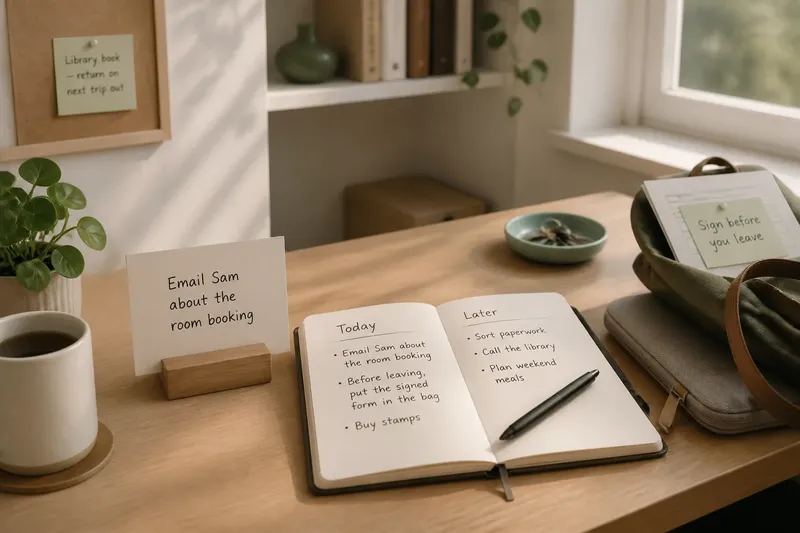
A reminder beside the kettle can catch you before you leave; the same note beside your keyboard may interrupt every time you look up. Choosing between one task in view and a gathered written list is not a contest between good and bad habits. It is a decision about whether a task needs a prompt or whether your visual field needs more calm.
The useful question is not simply, “What do I need to remember?” Ask instead, “At what moment would seeing this help?” Put a reminder where that moment happens, and keep other tasks somewhere you can consult deliberately. The following choices help match the reminder to the job.
1. Match visibility to timing
Keep a task visible when it has a clear cue in the immediate environment: a form to take to an appointment, a parcel to post on the way out, or a message to send after a particular conversation. The reminder works by meeting your eyes near the moment when action is possible.
A visible note is less useful if it has no natural point of contact. A card on the desk saying “sort paperwork” can remain in sight all day while offering no clue about when to begin. Put that broader task on a list instead, then choose a specific next action when you have time to work on it.
Say you need to return a library book during your next trip out. If you usually collect your keys from a bowl by the door, a note beside the keys can connect the task to that departure. A note in the middle of your desk may be easy to see but poorly placed for the moment that matters.
Give each visible prompt a destination and a reason to be there. A note attached to a document you must carry, or placed beside the item it concerns, can provide more useful context than a loose reminder among unrelated papers.
2. Use lists for choices
A written list suits tasks that need to be remembered but do not need to be seen continuously. It keeps several obligations available in one place, while allowing you to choose when to look at them. That separation can matter when a task is important but not relevant to the work in front of you.
Use a paper notebook, a single notes file, or a task app you already check. The tool matters less than having a dependable home for reminders that are not being acted on now. Scattering them across sticky notes, message drafts and scraps makes it harder to know which place to consult.
Keep list entries specific enough to prompt action. “Email Sam about the room booking” is easier to pick up than “admin”; “check the ingredients before shopping” gives a clearer next move than “food”. If a task contains several distinct actions, record the next one or make a short series of entries rather than leaving yourself a vague label.
A list can also hold tasks that are waiting on something else. Mark the condition in plain language, such as “ask about the room booking after the meeting”. That preserves the reminder without requiring it to stay in front of you before its cue arrives.
3. Protect the working surface
Every visible reminder asks for a glance, even when you cannot act on it. If the area where you read, write or cook is crowded with notes, the individual prompts can lose their distinction. Treat the main work surface like a kitchen counter: leave out the tool needed for the current job, and put the rest within reach rather than across the whole space.
Choose one location for the task currently under way. A small card beside your notebook, a note at the edge of a monitor, or a single line on a whiteboard can make the next action available without surrounding it with every unfinished job. Keep the wording short and action-led.
When a task is no longer current, move it to the list or remove it if it is done. Do not leave old prompts in place as decoration. They can make the space feel busy while providing no fresh information, and they may cause you to overlook the one reminder that still matters.
It can help to make a visible prompt temporary by design: write it on a small card rather than adding it to a permanent board, and clear the card when the action is complete. The point is not to keep the room empty; it is to make the active reminder easier to distinguish from background material.
4. Make lists easy to scan
A list only helps if you can find the relevant entry without turning the search itself into another task. Give it a consistent title, keep it in a familiar place, and use brief labels that make sense to you. If a phone app is buried among folders or a notebook is often left in another room, choose a simpler location.
Separate entries by the kind of attention they need rather than building a complicated filing system. For example, a short “today” section can sit above “later” entries, or you can group reminders by place: home, errands and work. Keep the categories few enough that adding a task remains straightforward.
A list should not become a second visual wall. When it grows, remove completed tasks and reconsider entries that no longer matter. If a task has been postponed repeatedly, decide whether to schedule a time, break it into a smaller action, ask someone for help, or let it go. Merely rewriting it can preserve the words without resolving the decision.
For a task that needs a prompt only at a particular transition, write that cue into the entry. “Before leaving, put the signed form in the bag” is more usable than “form” because it joins the action to the moment. If a digital reminder is more suitable, set it for a time or location you can actually respond to rather than relying on an alert you routinely dismiss.
5. Choose by task type
Some reminders benefit from being close to their object or place. Others are better held out of sight until you deliberately review them. Use these distinctions as a starting point, not a rigid rule:
- Use a visible prompt for a small action tied to a near-term cue, such as taking a document to the door.
- Use a list for a group of unrelated tasks that you will select from during a planned review.
- Use a visible prompt when the reminder must stay beside a particular item, such as a form that needs a signature before it goes into a bag.
- Use a list for tasks that are waiting on another person, a meeting or a later decision.
- Use one visible task when several open tasks compete with the work you have chosen to do now.
Some tasks can move between places. A reminder may begin on a list, become the current task, and then appear beside the object or location that supplies its cue. Once it is done, remove it. This movement is more useful than keeping every task permanently visible or forcing every task into one format.
Keep the system modest. If moving a task requires several tags, labels or copies, the process may draw more attention than the reminder deserves. A single list and one current prompt are often enough to distinguish “remember later” from “act here”.
6. Notice what gets missed
Pay attention to the kind of failure you are trying to prevent. If you forget a task because you do not encounter its cue, move the prompt closer to that cue or use an alert at the relevant moment. If you see a task repeatedly but cannot focus on anything else, remove it from the main field and keep it on your list.
Do not judge a setup by whether every note stays visible. Judge it by whether the right reminder reaches you at a useful moment, and whether other work remains possible. A prompt that is constantly present but no longer informative may be less helpful than a list you consult at a chosen time.
When a reminder is repeatedly missed, make one change at a time. Move it nearer to the action, make its wording more concrete, or choose a different place to keep it. A small adjustment makes it easier to tell whether the location or the wording was the problem.
Which reminder format fits?
Should I keep every task in sight?
No. Keep a task visible when seeing it is likely to help at a specific moment or beside a relevant object. Put unrelated or later tasks on a list so they do not compete with what you are doing now.
Where should I put a visible reminder?
Place it where the action begins or where its cue occurs, such as beside the item to take or near the place you leave from. Avoid putting it somewhere merely because that surface is available.
Is paper or a phone list better?
Choose the format you already consult reliably and can update without friction. Paper can stay open beside a workspace; a phone list can travel with you, but notifications and other phone activity may distract you.
What if I keep ignoring the note?
Check whether the task is too vague, the note is in the wrong place, or the action is not yet possible. Rewrite the next action or move the reminder to a list until its cue arrives, rather than adding more copies around the room.
Keep one prompt current
Choosing between one task or a visible list becomes simpler when each has a distinct job: the list stores what you may need later, and the visible prompt marks what is ready to act on here. Review the list at a time that suits your routine, then bring forward only the task that needs your attention now.
When the task is complete, clear its prompt before choosing another. That small act leaves the next reminder with a place of its own, rather than adding one more demand to a field already full of yesterday’s intentions.